

InnovGuide allows you to control, monitor, and update your connected devices from anywhere. Whether it’s smart locks, thermostats, or sensors, enjoy a streamlined experience that simplifies your property management.
How to Import Your Devices
When you first open the Devices tab, it may appear empty.
To start adding devices, you’ll need to connect InnovGuide to an IoT integration platform such as Seam.
For step-by-step instructions, check out this article: How to Connect External Applications to InnovGuide
Manage Your Devices
Once you’ve connected your device manager, you can control your devices directly from InnovGuide.
Your connected devices will appear in the Devices list, where you’ll be able to view key information at a glance, including:
- Device Name
- Associated Platform
- Device Type (e.g., lock, thermostat, sensor)
- Current Status (Online or Offline)
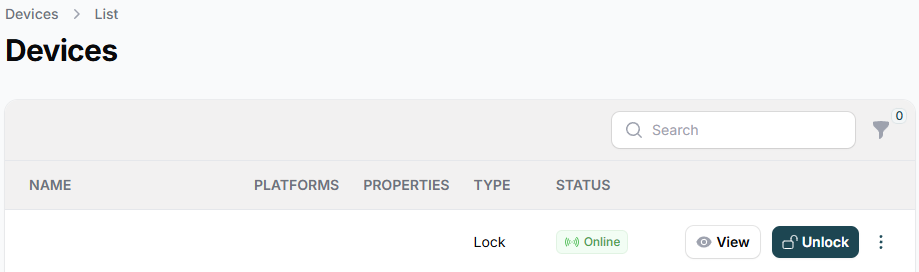
With just one click, you can remotely activate or deactivate any device.
You can also assign devices to multiple properties and track their activity history. For more details or to configure new access settings, simply click on View.
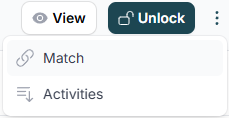
This overview allows you to monitor and manage your smart devices efficiently, all in one centralized interface.
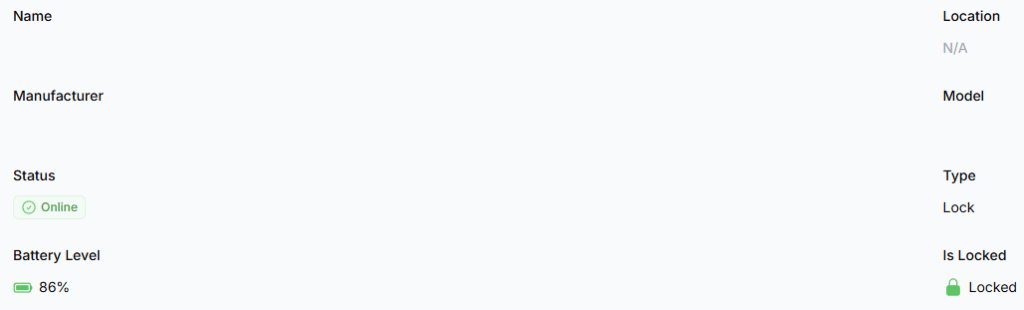
In the View tab, you will have access to more precise details like:
- Device Model
- Device Manufacturer
- Battery Level
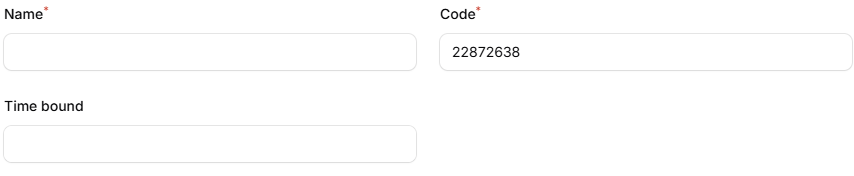
Set up a new access code by clicking “+ New Access Code”.
You’ll be able to define a name for the access, use the automatically generated code, and set the validity period for the access.
You can edit or delete your devices at any time, and review their history in the Events section whenever needed.
With InnovGuide, managing your smart devices becomes effortless, saving you time, reducing manual work, and keeping your properties secure and connected at all times.