The Bookings tab in InnovGuide allows you to manage and view all reservations made across your properties in one place. It provides detailed insights into each booking, like guest information, stay duration, and platform of origin.
Customize Your Bookings View
By default, the table displays key booking details about:
- Property: Name and image of the property.
- Precheckin: Displays the current state of the booking. (Confirmed, Pending, Cancelled).
- Guest information: Guest name, number of guests.
- Platforms: Where the booking was made (Airbnb, Booking, Hospitable,…).
- Occupancy: Displays the current check-in status of the guest.
- Check-in/Check-out: Stay duration (check in and check out time).
- Portal: Indicates how many times the guest has opened the guide.

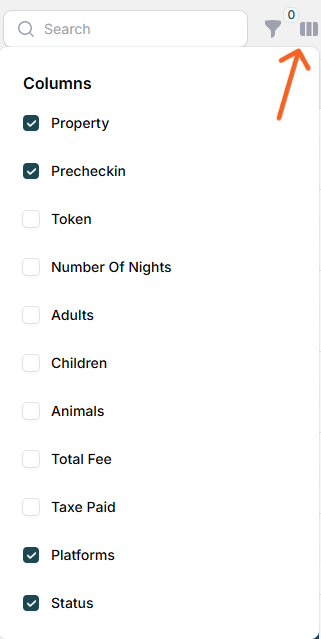
You can personalize your view by clicking the Column Filter icon located in the top-right corner of the table. This allows you to show or hide additional fields to better suit your needs.
Additional columns available include:
- Token
- Number of Nights
- Status
When you start having too many bookings, use the “Hide Past Bookings” option to improve readability.
Filtering & Search
Your bookings list can grow quickly, so we provide helpful tools to easily locate specific bookings when needed. Use the search bar to find bookings by guest name, property, or other identifiers.
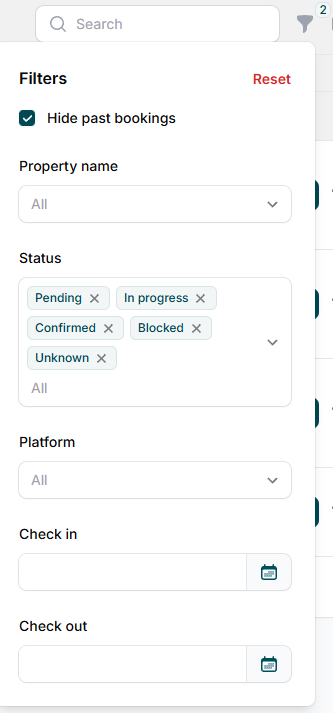
You also have access to a filter, allowing you to sort your bookings by the following criteria:
- Property Name
- Status
- Platform
- Check in and check out time
Wen you start too have to much booking, you use the hide past booking option to improve the lisibility.
Send Booking Information to Your Guests
With just a few clicks, you can send your Pre-checkin form or Digital Guide to your guests.
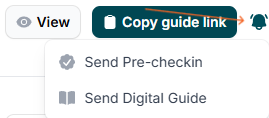
Explore this article to learn how to efficiently manage your guests and booking information right from this tab: How to Access Guest and Property Information Easily
With customizable views, powerful search and filter options, and quick access to sending important information to your guests, you have all the tools you need to keep everything organized and running smoothly